Hello! In this article, we’ll look at how to add anchor links (in-page links) to HTML that is generated dynamically through asynchronous communication in a Vue 3 + vue-router application, and how to navigate to those anchors correctly.
Although there are several articles on this topic online, many of them are outdated or don’t cover the exact scenario I encountered. I’m writing this article as a reference for anyone facing a similar problem.
Use Case
First, let’s define the scenario we’ll be working with.
This article assumes that page navigation is managed using vue-router.
Initially, only the outer HTML structure of the page is rendered. The page content is then fetched asynchronously from an API via Ajax, and the HTML is generated dynamically after the response is received.
The following sequence diagram illustrates the process.
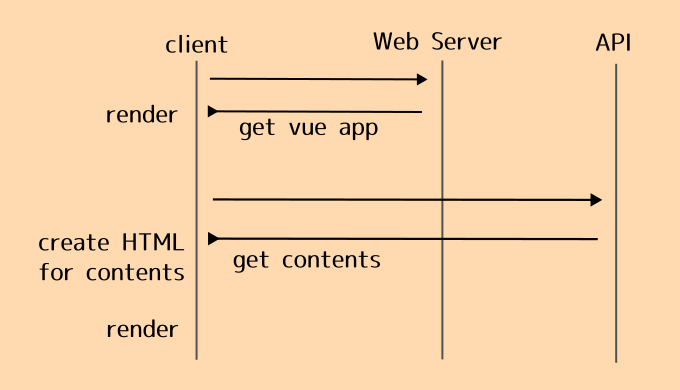
Since the table of contents and headings are generated only after the Ajax request completes, simply using Vue in the usual way won’t allow navigation to anchors via URLs containing a hash fragment. Likewise, handling direct access to a URL with a hash requires some additional work.
Navigating to an Anchor After Dynamically Rendering HTML
Let’s first look at how to navigate to dynamically generated anchors within the same page.
This can be achieved by configuring the scrollBehavior option in the createRouter() function.
For vue-router 4.x
const router = createRouter({
  routes: {
    ...
  },
  scrollBehavior(to, from, savedPosition) {
    if (to.hash) {
      return {
        el: to.hash,
        behavior: 'smooth' // Enable smooth scrolling
    }

    return {x: 0, y: 0} // Default behavior
  }

})
One important thing to note is that the syntax differs between vue-router 3.x and 4.x.
Many examples you’ll find online still target version 3.x, but those examples won’t work with vue-router 4.x.
If you’re using vue-router 3.x, use the following instead.
For vue-router 3.x
const router = createRouter({
  routes: {
    ...
  },
  scrollBehavior(to, from, savedPosition) {
    if (to.hash) {
      return {
        selector: to.hash,
        behavior: 'smooth' // Enable smooth scrolling
    }

    return {x: 0, y: 0} // Default behavior
  }

})
When navigating within the same page, the user clicks the link only after the page has already finished rendering, so you don’t need to worry about Vue’s lifecycle hooks.
The real challenge arises when the page is accessed from another page or directly via a URL containing a hash.
Direct Access via a URL with a Hash
The approach described above does not handle direct access to a URL containing a hash fragment.
That solution only works when navigating to an anchor that has already been rendered after a page update.
Here, I’ll introduce two different approaches.
Approach 1 and Approach 2 are independent solutions, so you can choose either one depending on your use case.
Approach 1: Modify the scrollBehavior Configuration
One option is to modify the vue-router configuration so that it waits for the page to finish rendering before scrolling.
With this approach, even direct access via a URL containing a hash can be handled.
The implementation is straightforward, although it has a drawback that we’ll discuss shortly.
const router = createRouter({
  routes: {
    ...
  },
  scrollBehavior (to, from , savedPosition) {
    if (to.hash) {
      console.log("url is hash")
      return new Promise((resolve, reject) => {
        setTimeout(() => {
          resolve({el: to.hash, behavior: 'smooth'})
        }, 300)
    }

    return {x: 0, y: 0}
  }

})
The downside of this approach is that it has no reliable way to determine whether the page has actually finished loading.
In this example, the timeout is set to 300 ms. If the API request and rendering process take longer than 300 milliseconds, scrolling to the anchor will fail.
For example, if you change the timeout value from 300 to 0, the navigation no longer works because the target element hasn’t been rendered yet.
The official vue-router 4.x documentation also introduces this technique as a way to wait for asynchronous processing, and it’s certainly easy to implement. However, because it relies on a fixed timeout rather than the actual completion of rendering, I decided not to use this approach in my project.
Approach 2: Scroll After the Component Has Finished Updating
The second approach is a more robust solution.
Instead of relying on a timeout, the component responsible for re-rendering the page waits until the rendering process has completed, retrieves the hash from the current URL, and then performs the scrolling.
Add the following method to the component that updates the page.
Option API
<script lang="ts">
import { defineComponent } from 'vue'
... // Other imports omitted

export default defineComponent({
  data: return {
  ... // Omitted
  },
  methods: {
    someFunction(): void {
      ... // Update logic, etc.
    },
    scrollToAnchor(): void { // Handle direct access via a URL containing a hash
      if (this.$route.hash) {
        let el = document.getElementById(this.$route.hash.substring(1));
        if (el) {
          el.scrollIntoView({behavior: 'smooth'});
        }
      }
    },
    ... // Other methods omitted
  },
  updated() { // Execute after the component has finished updating
    this.scrollToAnchor()
  }
})
</script>
Composition API
<script setup lang="ts">
import { onUpdated } from 'vue'
import { useRoute } from 'vue-router'
... // Other imports omitted

const route = useRoute()

function scrollToAnchor(): void {
  if (route.hash) {
    let el = document.getElementById(route.hash.substring(1));
    if (el) {
      el.scrollIntoView({behavior: 'smooth'});
    }
  }
}

... // Data update logic omitted

// Access the DOM after the component has finished updating
onUpdated(() => {
  scrollToAnchor()
})
</script>
Using the updated lifecycle hook (or onUpdated() when using the Composition API) ensures that the target element has already been rendered before attempting to scroll to it. This makes the implementation much more reliable than using a fixed timeout.
Summary
When HTML is generated dynamically and anchor links are added afterward, you need to take Vue’s lifecycle into account to ensure that navigation works correctly.
This issue does not occur when anchor links are defined directly in the component’s template, since those elements already exist when the page is rendered. It only becomes relevant when the page content itself is generated asynchronously—for example, after fetching data from an API.
I hope this article helps anyone who runs into the same issue.
