This article is the English translation of the Japanese article titled ‘2026年に使ってみたいオススメのLinuxディストリビューション34選’.
Let’s Use Linux in 2026 Too
Hello. This is the 12th year of our annual New Year’s Linux distribution introduction project. Traditionally, we have introduced distributions by their lineage, but starting last year, we changed the classification method slightly to categorize and introduce distributions by their purpose and usage situation. With the end of Microsoft Windows 10 support in 2025, many people may have become interested in free OSes like Linux and FreeBSD. Why not try installing Linux on your PC in 2026?
Whether you are already using Linux or are thinking of trying Linux for the first time, I hope this will be an opportunity for you to find the perfect Linux distribution for you.
Please also check out these past articles:
- 31 Recommended Linux Distributions to Try in 2025
- Let’s try Linux! 34 recommended Linux distributions for 2024
- 4 Recommended Linux Distributions for Beginners in 2024
- 4 Next Linux Distributions Recommended for Intermediate Users Familiar with Linux on Ubuntu
Selection Criteria
In a word, it’s the author’s preference. All the distributions introduced here are ones that the author has actually used and tried and felt, “Oh, this is interesting,” or “I’d like to introduce this.” If I were to dare to show criteria, I would consider the following points:
- Intended for desktop use
- Free to use without registration
- Developed community-based
In short, I want to introduce distributions that can be easily downloaded from the homepage and used freely for desktop purposes. ZorinOS, developed by a company, is also introduced because it is distributed free of charge. Every year, I receive complaints like, “It’s a Linux introduction article, but it’s strange not to cover RHEL (Red Hat Enterprise Linux),” but I kindly ask you to calm your anger.
Request and Notes
This article is written with the desire to deliver information as accurately as possible based on the author’s actual trials, but there may be errors in the content. If you find any errors, please kindly let the author know privately.
Also, for actively developed distributions, the content of the article may quickly become outdated. Please keep in mind that the content of the article is as of January 2026 when reading it.
Recommended Distributions for Those Who Want to Migrate Smoothly from Windows or Mac
Here, we introduce distributions with similar UIs for those considering migrating from Windows or Mac. Please also consider “Classic Desktop Distributions Friendly to Beginners” in the next section.
AnduinOS
Smooth Migration with a Windows-like UI
| Item | Rating/Description |
|---|---|
| Base | Ubuntu |
| Package Management | APT/Flatpak |
| Standard UI | GNOME-based DE |
| Japanese Display | No problem |
| Japanese Input | ibus-mozc available from the start |
| Ease of Installation | 5 points |
| Recommendation for Beginners | 5 points |
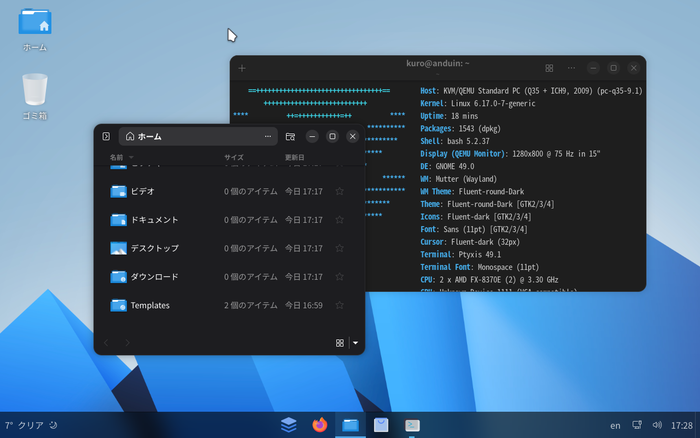
AnduinOS became a hot topic because of its Windows-like appearance. It is a distribution developed based on Ubuntu, centered around former Microsoft engineer Anduin Xue. The desktop environment (DE) is designed with Microsoft Windows in mind, so it should be easy for Windows users to migrate.
For package management, from Ver 1.3, it uses a mixture of Ubuntu packages and Flatpak packages. This is a major trend in modern Linux distributions, with many distributions moving towards Ubuntu packages for CUI applications and OS core packages, and Flatpak (or snaps, AppImage) for major GUI applications. AnduinOS’s standard software center allows users to seamlessly install, remove, and update packages without being aware of which package type it is.
Regarding the Japanese environment, installation is possible in Japanese from the start, and both Japanese display and input have the necessary packages installed. When the author tried it, it was necessary to adjust the keyboard settings slightly, but Japanese input was generally possible without problems.
Zorin OS
For Those Who Want to Be Particular About Both Appearance and Functionality
| Item | Rating/Description |
|---|---|
| Base | Ubuntu |
| Package Management | APT |
| Standard UI | Customized GNOME |
| Japanese Display | No problem |
| Japanese Input | ibus-mozc pre-configured |
| Ease of Installation | 5 points |
| Recommendation for Beginners | 5 points |
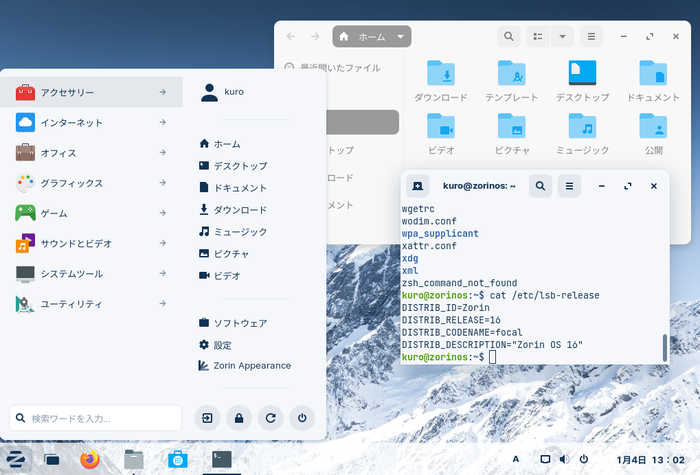
ZorinOS is a distribution based on Ubuntu with a customized GNOME UI. When it first appeared, it was characterized by a sharp, futuristic design, but in recent years, it has shifted towards a simple and clean design. It is a distro that is particular about its appearance and also includes its own tools for customizing the desktop design. It is designed with users migrating from Windows or Mac in mind, with wine and media codecs installed from the start. The basic parts of the system are composed of the same packages as Ubuntu, so the abundant Ubuntu information available online will be useful.
ZorinOS frequently changes its editions, but until last year, there were Pro, Core, and Lite versions. As of January 2026, three types are released: Pro (paid version), Core, and Education. The Education version comes with pre-installed apps and games for students. Please see the official page for details.
elementaryOS
Why not experience a meticulously designed masterpiece?
| Item | Rating/Description |
|---|---|
| Base | Ubuntu |
| Package Management | APT |
| Standard UI | Pantheon |
| Japanese Display | No problem |
| Japanese Input | Manual setup required |
| Ease of Installation | 4 points |
| Recommendation for Beginners | 4 points |
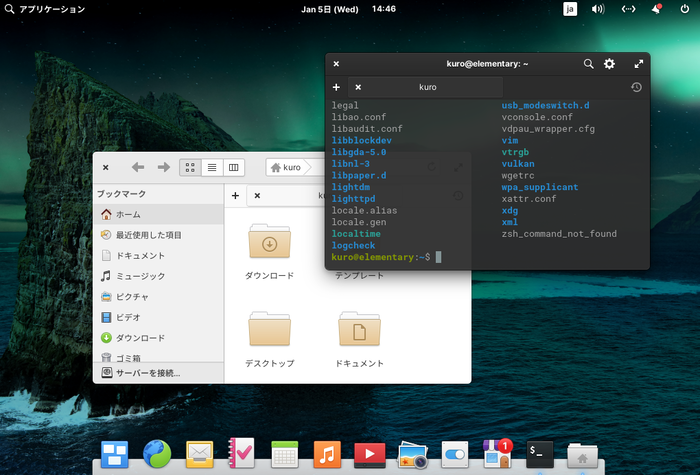
ElementaryOS is a distribution that embodies a strong will to provide an optimally tuned masterpiece rather than allowing users to freely customize it. Its commitment to providing a simple and refined environment is so strong that it has even developed its own Pantheon desktop environment. The official documentation describes its extraordinary passion for design, which can truly be called a philosophy. Its dedication to UI/UX reminds me of Apple products. If you are a Mac user interested in Linux, elementaryOS might be suitable for you.
Whether this commitment suits you or not will be a major criterion for choosing ElementaryOS. It may not be suitable for those who want to customize their system or desktop environment like a plastic model. On the other hand, for those who like the design, it may become an indispensable companion.
Classic Desktop Distributions Friendly to Beginners
We have gathered distributions that are easy for Linux beginners to use, including Ubuntu, which is easy to handle, and other distributions that are easy to use for desktop purposes. Many of the distributions introduced here have a complete Japanese environment immediately after installation. Please use this as a reference for choosing your Linux distro.
Ubuntu
The Epitome of Linux, Ready to Use Right After Installation
| Item | Rating/Description |
|---|---|
| Base | Debian |
| Package Management | APT |
| Standard UI | GNOME Fork UI, (flavors like KDE, Xfce, MATE, Budgie, LXQt available) |
| Japanese Display | No problem |
| Japanese Input | ibus-mozc is default (24.04 LTS) |
| Ease of Installation | 5 points |
| Recommendation for Beginners | 5 points |
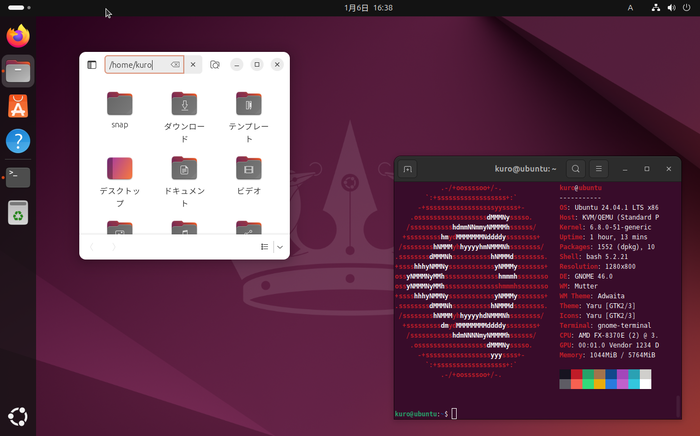
Ubuntu was created based on Debian, aiming to be a Linux that can be used immediately after installation. In contrast to Debian, which was developed primarily by the community, Ubuntu has been developed primarily by Canonical. Ubuntu actively incorporated packages that could not be included due to licensing issues, prioritizing freedom, and provided an environment that is easy for users to use. While Debian was particular about being free, Ubuntu tends to “prioritize practicality over ideology” by incorporating non-free licensed items. As a result, music and video playback are smooth, contributing to dispelling the image of “Linux can’t do that” and establishing its position as a desktop Linux distribution. Furthermore, its hardware recognition capabilities are high, so drivers are installed automatically. It truly embodies “ready to use right after installation,” and the barrier to entry is low. Package management is APT, inherited from Debian, but packages from snap, a universal package manager developed by Canonical, can also be used seamlessly from the software center.
It is often said to be for beginners, but more accurately, it is “beginner-friendly.” Due to its ease of use, it has rapidly increased its user base and gained market share not only in desktop use but also in server and cloud fields. While Red Hat-based systems are still dominant in server use, those who want to study servers will also benefit from getting familiar with Ubuntu.
Regarding the Japanese environment, a Japanese Remix version was provided by the Ubuntu Japanese Team, but it has been announced that the Japanese Remix version will not be provided for Ubuntu 24.04 LTS (see link). The Ubuntu Japanese Team repository continues to be provided, so it is recommended to add it. Ubuntu offers official flavors, which have the same basic components but different desktop environments. By selecting a flavor, you can choose desktop environments such as KDE, MATE, Cinnamon, Budgie, Xfce, LXQt, and Unity.
Debian
The Origin of Debian-based Distros is Here
| Item | Rating/Description |
|---|---|
| Base | Original |
| Package Management | APT |
| Standard UI | GNOME, KDE, Xfce, MATE, LXDE, LXQt, Cinnamon |
| Japanese Display | No problem |
| Japanese Input | uim-mozc available from the start |
| Ease of Installation | 5 points |
| Recommendation for Beginners | 4 points |
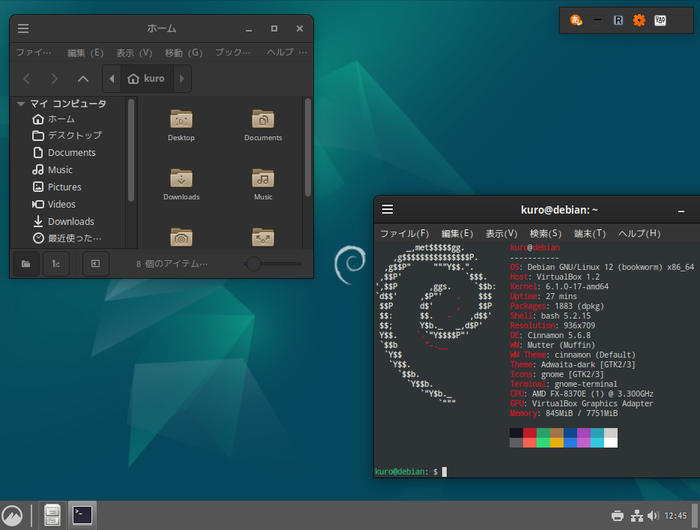
Debian is a distribution developed by the Debian Project, which is run by the community, and it has a reputation for stability. While being developed community-based, it created the groundbreaking package management tool APT (Advanced Package Tool) at the time, and its achievement in growing into a distribution comparable to systems developed by companies is a great feat. In that respect, it stands apart from openSUSE and Fedora, which have grown with corporate assistance. Compared to Ubuntu, “matured” packages are introduced, so it boasts high stability, but on the other hand, it may not be suitable for those who always want to use the latest version of software. The days when Debian was said to be difficult to install are long gone. Now, installation can be done with a GUI Japanese screen, and the barrier to entry has been greatly lowered. The Japanese environment also has no problems with display or input if Japanese is selected during installation. (uim-mozc is available by default) The Debian Project upholds the “Debian Social Contract” and places great importance on “freedom,” so proprietary packages such as media codecs and various drivers are not provided as part of Debian and require manual installation. This is a major difference from Ubuntu, which also provides proprietary packages and aims to be “ready to use right after installation.” Debian is a wonderful project, but it may feel a little intimidating. To experience the greatness of Debian, you might want to try SpiralLinux.
Linux Mint
Enjoy a Modern and Elegant User Experience
| Item | Rating/Description |
|---|---|
| Base | Ubuntu / Debian |
| Package Management | APT |
| Standard UI | Cinnamon, MATE, Others |
| Japanese Display | No problem |
| Japanese Input | Settings required in the settings screen |
| Ease of Installation | 5 points |
| Recommendation for Beginners | 4 points |
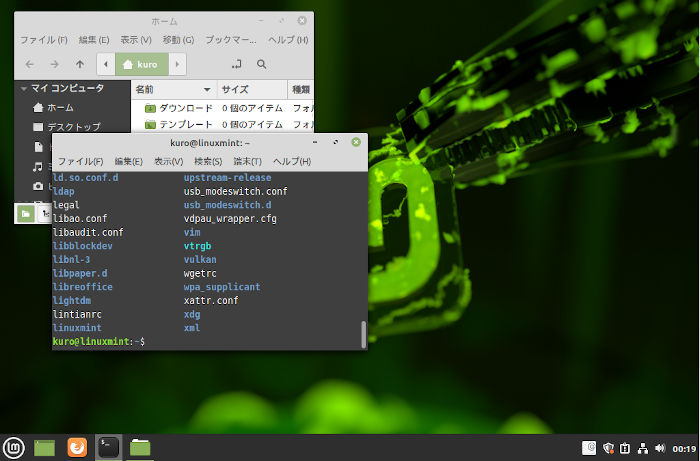
Linux Mint aims to provide a user-friendly, modern, and elegant environment rather than simplicity, and it is a popular distribution among those who resonate with this philosophy. Desktop environments such as Cinnamon and MATE, which can now be used in many distributions, were born from the Linux Mint project. There are traditional Ubuntu-based versions and Debian-based LMDE (Linux Mint Debian Edition). Mint’s unique MintTools are a set of tools for performing system operations such as software updates and installations, replacing similar tools in the Ubuntu base. By providing such tools, it differentiates itself from Ubuntu, and whether you like this aspect will be the deciding factor in your choice. Regarding the Japanese environment, there are no problems with display immediately after installation. For input, the state immediately after installation changes with each version, and it is not stable. In 21.2-cinnamon, ibus-mozc was installed by default, but in 22-cinnamon, it was changed to a method of setting the input method from the settings screen. It is not a particularly difficult operation, but if you click the install button, both ibus and fcitx will be installed together, so be careful if you want to install them individually. If you want to install fcitx5, you need to install it manually.
MX Linux
Robust and Practical Realism
| Item | Rating/Description |
|---|---|
| Base | Debian |
| Package Management | APT |
| Standard UI | Xfce, KDE, Fluxbox |
| Japanese Display | No problem |
| Japanese Input | Manual setup required |
| Ease of Installation | 5 points |
| Recommendation for Beginners | 4 points |
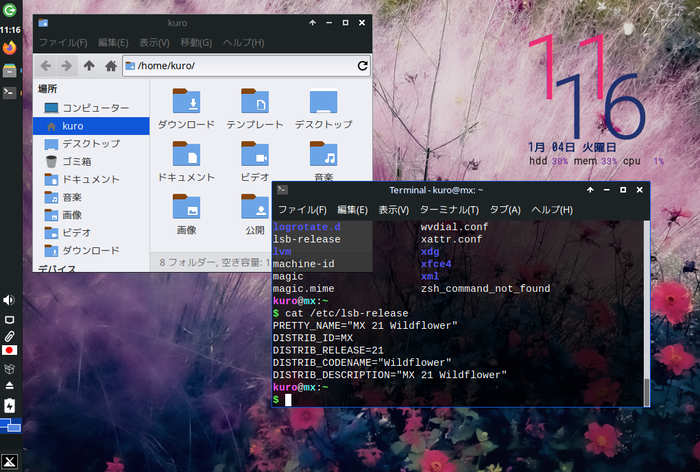
MX Linux is a Debian-based distribution created through the collaboration of the antiX community, a lightweight Debian-based distribution, and the MEPIS community, also Debian-based. This project aims to provide an elegant and efficient desktop environment and a simple, stable, mid-weight OS. For desktop environments, you can choose Xfce as the main, as well as KDE and Fluxbox versions. The biggest feature of MX Linux is that it provides its own set of MX Tools for users. These MX Tools aim to enhance the completeness of the desktop machine and provide more convenient functions to users. MX Tools also make it easy to install media codecs. In addition, by having its own repository, it is easy to introduce proprietary packages. Its good balance of Debian’s robustness and the practicality of its unique tools seems to have gained many loyal users. I think it is a recommended distribution for those who are new to Deb-based distributions. Installation can be done easily by simply answering the questions in Japanese. The fact that Japanese is displayed without any settings immediately after installation is also a welcome point for Japanese users. On the other hand, Japanese input requires manual setup. The difficulty is not that high if you refer to Debian information, but if you are not confident, it might be better to get used to it with Ubuntu or similar first. I wrote an article about Japanese input in MX Linux. Please refer to it.
Solus
Sophisticated Design for All Desktop Users
| Item | Rating/Comment |
|---|---|
| Base | Original |
| Package Management | eopkg |
| Standard UI | Budgie, GNOME, MATE, KDE |
| Japanese Display | Displays without problems |
| Japanese Input | Manual setup required |
| Ease of Installation | 5 points |
| Recommendation for Beginners | 4 points |
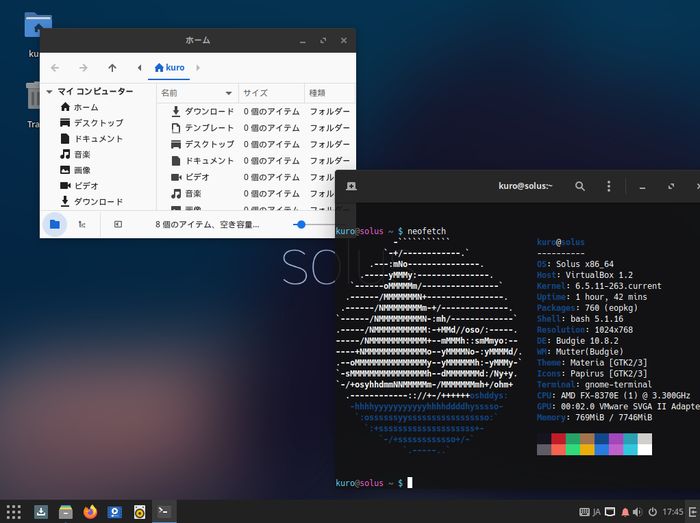
Solus is a relatively new independent distribution officially released in December 2015. It was originally developed under the name Evolve OS. The Solus Project develops a simple and functional Budgie desktop as its standard environment. Currently, GNOME and MATE versions are also distributed. Budgie is created with GTK+ technology and is a unique desktop environment built from scratch by the Solus team, not a fork of another project. The screen layout is similar to MATE and Cinnamon, but it incorporates a more flat design, giving it a modern impression. Budgie, created for Solus, is now available as an independent package for other distributions such as Ubuntu and Arch Linux. Previously, OS installation was only in English, but now it supports Japanese and can be installed easily. Regarding Japanese display, fonts are installed from the start, so there are no problems, but Japanese input requires manual package installation and setup. When it first appeared in 2015, there were few Japanese packages, and anthy had to be used, but now official packages are abundant, and mozc can be used. The fact that popular proprietary applications such as Skype, Slack, and Google Chrome can be easily installed will be welcomed by those who want to use Linux easily. Also, since flatpak is available by default, even if a package is not in the official repository, it can be supplemented by searching for it in flatpak.
Fedora
A Free and Up-to-Date Environment for Developers
| Item | Rating/Comment |
|---|---|
| Base | Original |
| Package Management | DNF |
| Standard UI | GNOME (KDE, Xfce, i3, etc. spins available) |
| Japanese Display | No problem |
| Japanese Input | ibus-kkc available by default |
| Ease of Installation | 5 points |
| Recommendation for Beginners | 4 points |
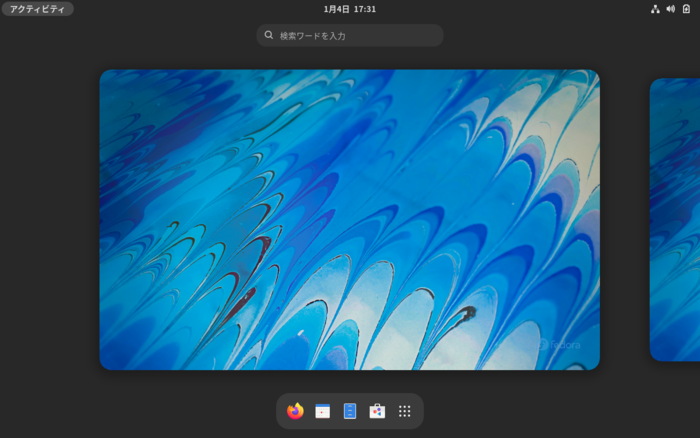
Fedora is a distribution developed by the “Fedora Project” community with the support of Red Hat. The achievements obtained from Fedora are incorporated into Red Hat Enterprise Linux (RHEL), and it also plays a significant experimental role. Therefore, it often introduces the latest packages with unknown safety, and sometimes drastic specification changes are made with each version. Because it emphasizes being free, packages with non-free licenses are not included in the official repository. Therefore, for multimedia codecs and other packages, third-party repositories must be manually registered. In Fedora 35, the option to add third-party repositories during installation became available. Regarding the Japanese environment, it can be used without problems during installation, and for display and input after installation. Desktop environments include KDE, Xfce, LXQt, MATE, Cinnamon, LXDE, SODA, and i3 spins.
Mageia
Why not be captivated by European magic (Mageia)?
| Item | Rating/Description |
|---|---|
| Base | Original |
| Package Management | DNF/urpmi |
| Standard UI | KDE, GNOME, LXQt, Xfce, etc. |
| Japanese Display | No problem |
| Japanese Input | ibus-mozc, ibus-anthy installed *1) |
| Ease of Installation | 5 points |
| Recommendation for Beginners | 4 points |
*1): For GNOME version, input method settings are required in the settings screen
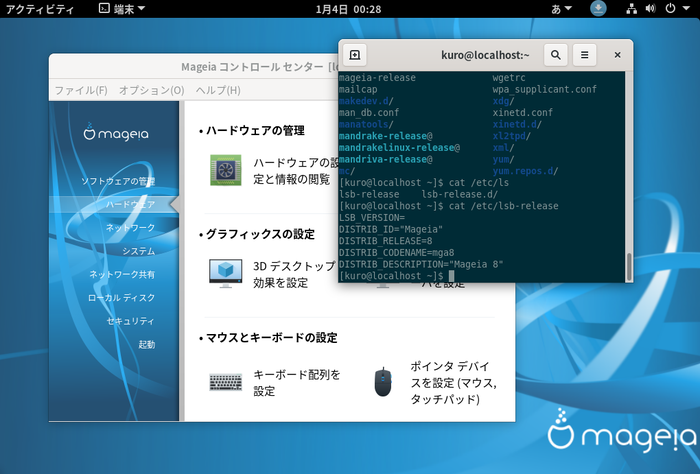
Mageia is genealogically a fork of Mandriva Linux, inheriting the Mandrake lineage. Therefore, it is sometimes called Mandrake-based, but here it is treated as Red Hat-based due to the commonality of handling RPM packages. Other distributions that inherit the Mandrake lineage include PC Linux OS and Open Mandriva. Mandriva’s development base was in France, so it is a popular distribution in Europe. Its usability feels very similar to OpenSUSE. System settings can be done with the Mageia Control Center, a settings tool. This tool is equivalent to the Windows Control Panel, suggesting the high completeness of a desktop-oriented distribution. Installation is easily completed by simply filling in the required items according to the Japanese GUI. This is not a unique feature of Mageia, but the low barrier to installation is an important factor for beginners. The Japanese environment is relatively well-prepared, and Japanese display is not a problem immediately after installation. For Japanese input, ibus is pre-configured for KDE, so Japanese input is possible without special settings. Urpmi, which has been used as the core of package management in Mandrake-based distributions, can now also use DNF. RPM package managers include DNF (formerly YUM), APT-RPM, urpm, etc., but the trend may be to unify to DNF in the future.
OpenSUSE
Chameleon excels at work and play
| Item | Rating/Comment |
|---|---|
| Base | Original |
| Package Management | YaST / zypper |
| Desktop Environment | GNOME, KDE, Xfce, icewm, etc. |
| Japanese Display | No problem |
| Japanese Input | ibus-mozc pre-configured |
| Ease of Installation | 5 points |
| Recommendation for Beginners | 5 points |
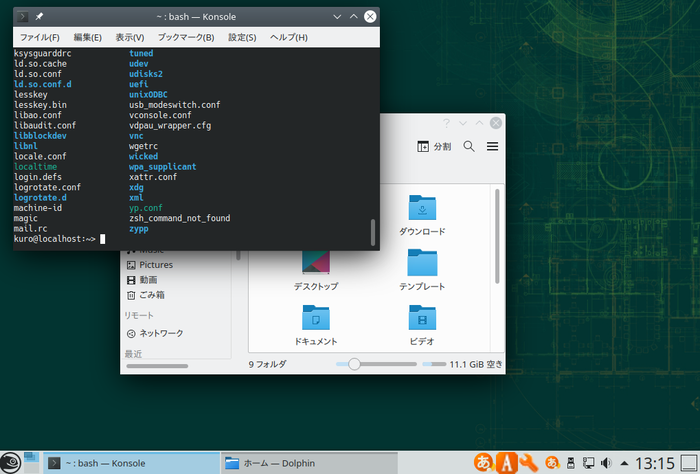
openSUSE is a community-developed distribution. Historically, it has been associated with Slackware and is sometimes referred to as Slackware-based (Wikipedia (Slackware Derivatives)), but it is now often considered an independent SUSE-based distribution. It receives support from SUSE, and the achievements gained from openSUSE are fed back into SUSE Linux Enterprise (SLE). In that respect, it can be said to be a corporate-backed distribution, similar to Fedora. Since 2015, it has been co-developed with SLE. openSUSE has a stable version called Leap and a rolling release version called Tumbleweed, which always has the latest packages, but Leap is recommended for beginners. Packages are RPM packages, similar to Red Hat-based systems, but unlike Red Hat’s package management method, package management is done with the GUI YaST and the command-line Zypper. The common rpm command for RPM systems can, of course, be used. From an early stage, it aimed to be a user-friendly distribution and developed YaST as a key tool for system and package management that does not rely on command-line operations. YaST2, which also runs on X systems, is also available. Installation can be done easily with a Japanese GUI installer, and desktop environments such as GNOME, KDE, Xfce, and LXDE can be selected, and Cinnamon, MATE, etc. can be installed later. Japanese display and input can be used without any special settings immediately after installation.
As an aside, OpenSUSE’s mascot, the chameleon Geeko, is said to be a combination of geek and gecko, but I wonder if it would have been better as a gecko rather than a chameleon?
Regata OS
A Distro Aiming for Linux for Everyday Use
| Item | Rating/Description |
|---|---|
| Base | OpenSUSE |
| Package Management | YaST2 / zypper |
| Standard UI | KDE Plasma |
| Japanese Display | No problem |
| Japanese Input | Manual setup required |
| Ease of Installation | 5 points |
| Recommendation for Beginners | 4 points |
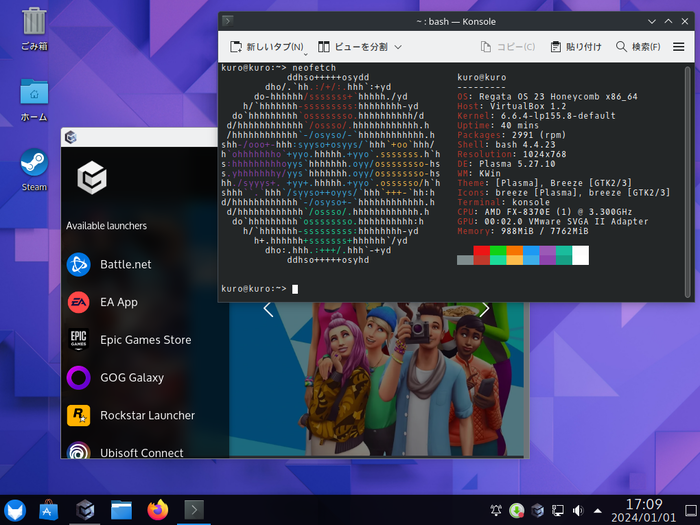
RegataOS is a distribution designed for everyday use of Linux, aiming to be usable without complicated settings. In that respect, its concept is similar to Ubuntu. OpenSUSE, its base, is also a highly regarded distribution that can be used without any special settings after installation, so RegataOS’s ease of use is inherited from its parent. RegataOS comes with Google Drive synchronization built-in by default, so after installing and setting up an account, you can handle files without being aware of local and cloud storage. If you use RegataOS on multiple machines, data sharing becomes truly easy. Furthermore, in the gaming field, which was previously a stronghold of Windows, it is equipped with Vulkan, a cross-platform 3DCG computation API, to allow users to enjoy games without any settings, and it can run games developed with Xdirect. It also includes tools such as Valve’s Steam and Regata OS Game Access, creating an environment for gaming.
Sparky Linux
A Light and Snappy Overachiever
| Item | Rating/Description |
|---|---|
| Base | Debian / Debian testing |
| Package Management | APT |
| Standard UI | LXQT, Xfce |
| Japanese Display | No problem |
| Japanese Input | Manual setup required |
| Ease of Installation | 5 points |
| Recommendation for Beginners | 4 points |
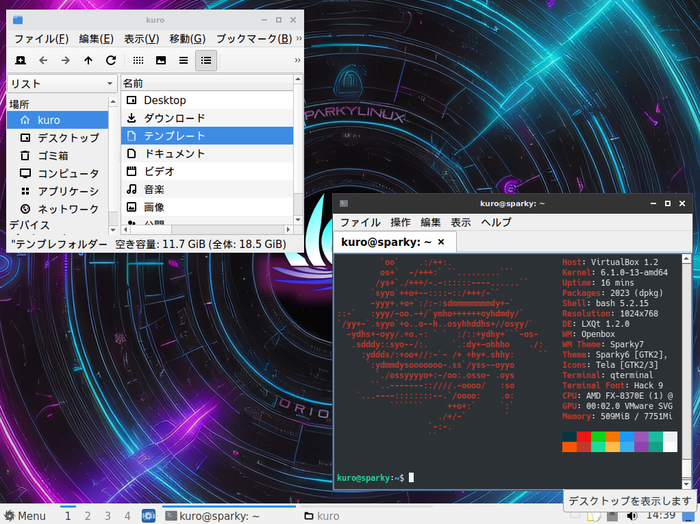
Sparky Linux has a stable version based on Debian stable and a semi-rolling release version based on Debian Testing. It was developed with the goal of being a system that is ready to use right out of the box. For users who want to use their preferred desktop environment (DE), there are also minimal OpenBox versions and DE-less versions. Installation is very easy with a GUI and in Japanese. If you choose the semi-rolling release version, you can continue to use the system without worrying about system support periods after a single installation. Japanese input requires manual setup.
Since it uses a relatively lightweight desktop environment, it is also suitable for reviving slightly older PCs.
For the Geek Who Wants to Manage Their Own System
This section introduces distributions recommended for geeks who want to build their system from a minimal environment or manage it manually. While it requires effort for system maintenance, you can experience the versatility of understanding every detail of the system and controlling it manually. Furthermore, many of the distros introduced here are the origins of their respective derivative distros, so learning how to use them will also give you a deeper understanding of their derivatives. For power users, an article is also available at , so please take a look if you like.
Slackware
A Coelacanth That Continues to Evolve
| Item | Rating/Comment |
|---|---|
| Base | Original |
| Package Management | slackpkg / pkgtool |
| Standard UI | KDE, Xfce, Fluxbox, Openbox, fvwm2, twm, wmaker |
| Japanese Display | Environment variable settings required |
| Japanese Input | Environment variable settings required |
| Ease of Installation | 2 points |
| Recommendation for Beginners | 1 point |
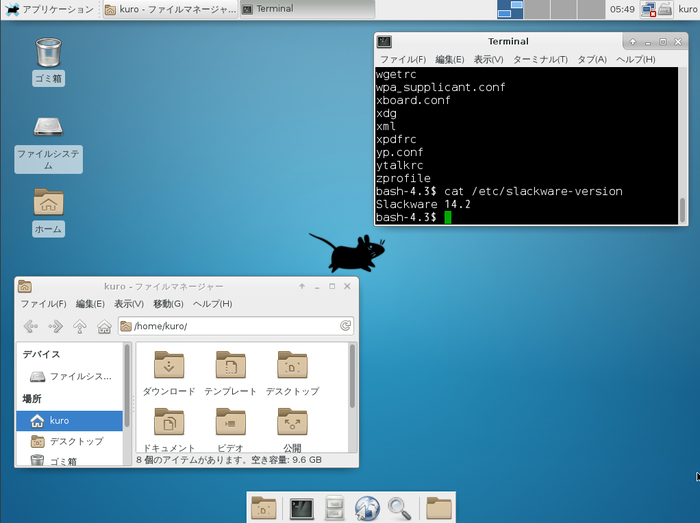
Slackware, one of the oldest Linux distributions. Many of you may be familiar with it. While modern package management distributions are gaining popularity, it may seem a bit overshadowed, but it still has many fans. Until slackpkg appeared in version 12.2, users had to resolve package dependencies themselves, which made system management cumbersome. With slackpkg, it became possible to download packages, resolve dependencies, and install them, which greatly improved convenience. Also, for packages not in the official repository, there are build scripts (Slackbuild files) posted by users on Slackbuilds.org, which can be easily built. In 2022, the long-awaited Slackware 15 was released. The Japanese input environment fcitx, which had to be installed from SBo until 14.2, has now become an official package. If you install fcitx-mozc from SBo, you will be able to input Japanese using Mozc. Slackware-related articles are available in the author’s articles. Please refer to them.
Arch Linux
Experience a Simple System Built from a Minimal Configuration
| Item | Rating/Comment |
|---|---|
| Base | Original |
| Package Management | pacman |
| Standard UI | None (user can freely install) |
| Japanese Display | Manual setup required |
| Japanese Input | Manual setup required |
| Ease of Installation | 2 points |
| Recommendation for Beginners | 2 points |
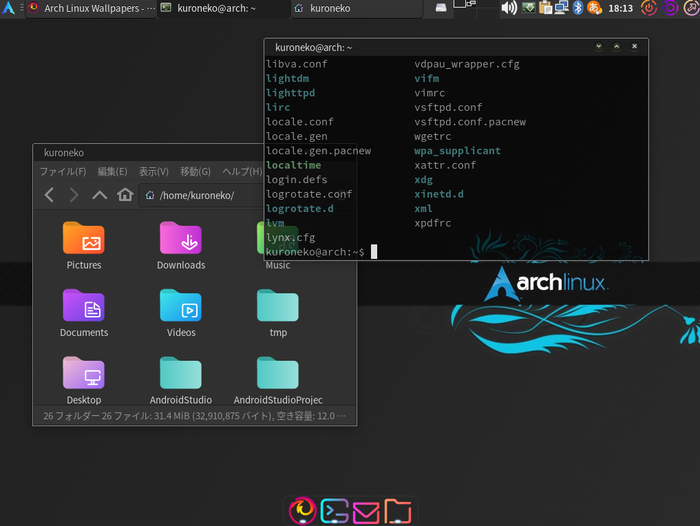
Arch Linux is a distribution that advocates “minimal and simple” and allows users to build their desired environment from a minimum system configuration. Arch Linux stands apart from all-in-one distros like Ubuntu, which are considered beginner-friendly, and is popular among intermediate users. One of its characteristics is its rolling release format, which means that once installed, the OS can be used continuously without needing to be reinstalled. Being able to build from a minimal environment means you can choose and use only what you need. Why not give it a try? You’ll enjoy a different world of Linux than all-in-one distros like Ubuntu.
Gentoo
For Those Who Want the Best Tune-up for Their Machine
| Item | Rating/Comment |
|---|---|
| Base | Original |
| Package Management | Portage |
| Standard UI | None. User can freely choose |
| Japanese Display | Setup required, including font installation |
| Japanese Input | Manual setup required |
| Ease of Installation | 1 point |
| Recommendation for Beginners | 1 point |
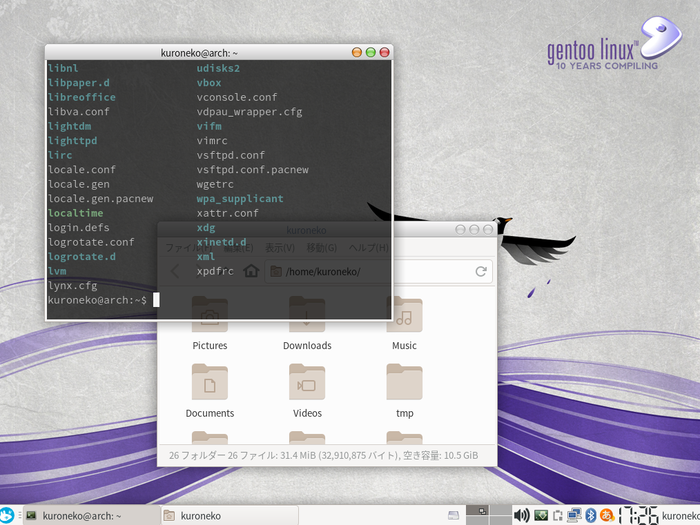
Gentoo Linux is built on the philosophy of building every package, including the kernel, within the machine. In modern times, where binary distribution built by developers is common, it is sometimes seen as a distro for power users. However, the ability to finely configure and build packages is a very attractive aspect, and it has many loyal fans. Installation is done manually via the command line. There is no convenient installer. Since the Linux kernel also needs to be built and installed by yourself, this process is sometimes referred to as an “installation battle.” However, if you have experience installing Arch Linux or CRUX, you probably don’t need to fear it much. If you are not confident, trying Sabayon first might be a good idea.
Void
A Challenge from Scratch!
| Item | Rating/Comment |
|---|---|
| Base | Original |
| Package Management | XBPS |
| Standard UI | Xfce version available |
| Japanese Display | Setup required, including font installation |
| Japanese Input | Manual setup required |
| Ease of Installation | 2 points |
| Recommendation for Beginners | 2 points |
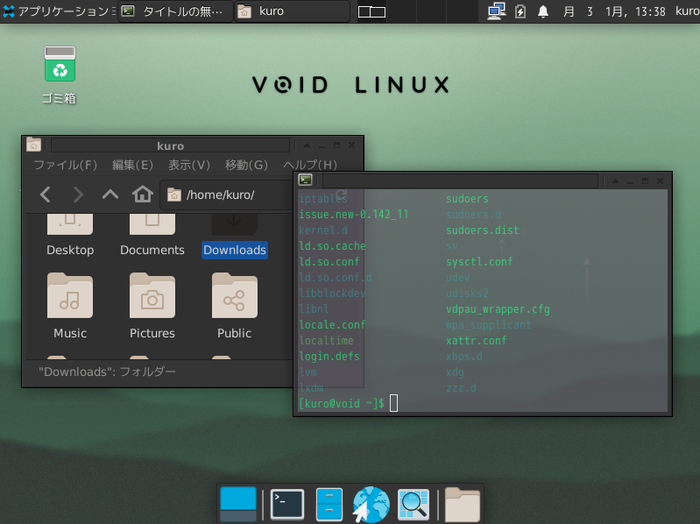
Void Linux is not a fork of other distributions but a distribution created from scratch by volunteers. The package manager and build system are built from scratch, and it adopts a stable rolling release. These points are very similar to Arch Linux and CRUX. It uses XBPS for package management and runit for the init system and service management. Installation comes with an ncurses-based TUI installer, and although everything is done in English, it is not particularly difficult and can be done without difficulty if you have experience installing Slackware or similar. However, for those accustomed to modern, user-friendly GUI installers, it may be a high hurdle. However, basically, all operations will be performed in English.
This article is written on Void Linux. It was a distribution I started using as a trial, but I’ve grown to really like it. My struggles with installation and environment setup are summarized in Void Linux articles, so please refer to them.
CRUX
For Those Who Want to Experience Ultimate Simplicity
| Item | Rating/Comment |
|---|---|
| Base | Original |
| Package Management | Build by Ports |
| Standard UI | None, but Openbox, i3 selectable from Opt Ports |
| Japanese Display | Manual setup required |
| Japanese Input | Manual setup required |
| Ease of Installation | 1 point |
| Recommendation for Beginners | 1 point |
CRUX proclaims “Keep it simply” as its slogan and is a distribution that adopts a simple BSD-style init system and a Ports-based package management method that builds from source code. It is aimed at users with some Linux experience and is recommended for those who are not hesitant to edit system configuration files or build from source code. Similar distributions include Gentoo Linux and Slackware, but recent Slackware has added many convenient tools and may have moved a bit further away from CRUX. Arch Linux, while influenced by CRUX and similar in its philosophical aspects, differs significantly in that it handles many packages in binary form. The installer is very simple, and most operations need to be done via command line, making installation difficult even for beginners. My personal impression is that the installation difficulty is about the same as Gentoo. Regarding the Japanese environment, it is better to assume you will build it yourself. There are no packages for Japanese input, so you will need to find unofficial Ports or build them yourself. (As of January 2025, I believe there are no official Ports. Please let me know if I’m wrong.)
NixOS
An OS Embodying the Purity of Functional Programming Languages
| Item | Rating/Comment |
|---|---|
| Base | Original |
| Package Management | Nix |
| Standard UI | GNOME, KDE, Xfce, Pantheon, etc. |
| Japanese Display | Display possible, but font installation recommended |
| Japanese Input | Manual setup required |
| Ease of Installation | 5 points |
| Recommendation for Beginners | 2 points |
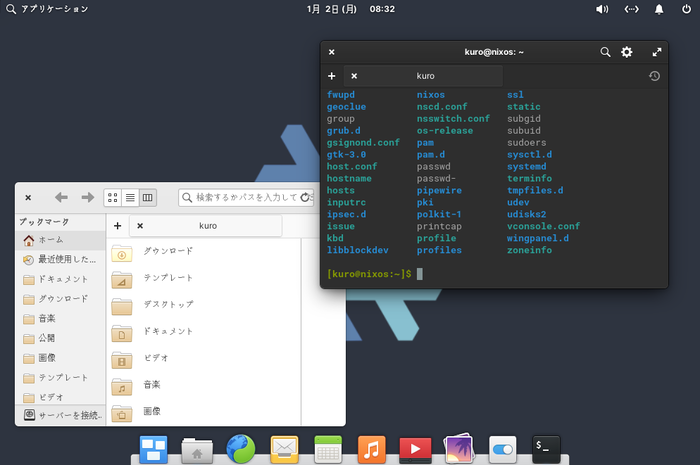
NixOS is a distribution supported by many developers. Its philosophy is to operate the system non-destructively, designed to avoid destructive actions (like assignment in programming languages) on the system, similar to pure functional languages without side effects. Because there are no destructive actions like overwriting files, rollbacks are easy. For many developers, setting up a development environment, considering language, library, and tool dependencies, is cumbersome, but NixOS solves this problem with its package manager called Nix. Projects like IHP in Haskell have emerged that set up development environments using Nix. Furthermore, system settings can be done using the Nix language, a functional programming language, making it a distribution that truly incorporates the philosophy of functional programming languages into the system. However, because its philosophy differs significantly from other distributions, it may have quirks and cause confusion. Beginners should probably get used to beginner-friendly distributions like Ubuntu or Fedora before trying NixOS.
For Those Who Want to Try Arch-based Distros
Arch Linux is popular, but some people find the command-line installation and building from a minimal environment to be a hurdle. We’ve gathered some Arch-based distributions that even such people can easily use. Even within Arch derivatives, there is a wide variety, including customizations to make Arch Linux easier to use, those that use alternative init systems to Systemd, and those with flashy visual customizations.
EndeavourOS
Arch Linux Made More Approachable
| Item | Rating/Comment |
|---|---|
| Base | Arch |
| Package Management | pacman |
| Standard UI | Xfce, KDE, GNOME, etc. selectable |
| Japanese Display | Japanese fonts installed, display no problem |
| Japanese Input | Manual package installation required |
| Ease of Installation | 5 points |
| Recommendation for Beginners | 3 points |
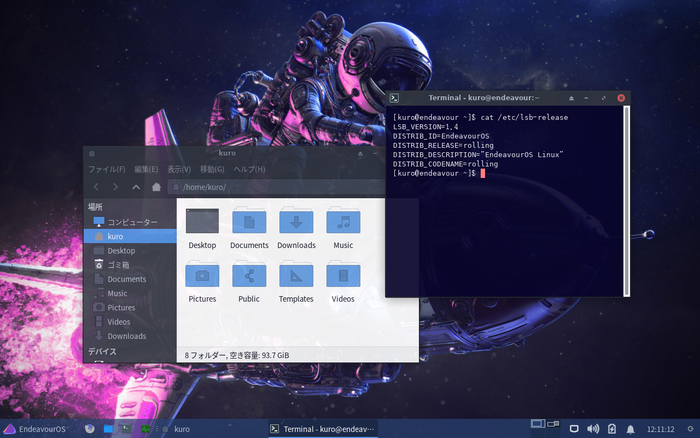
EndeavourOS is a distribution based on Arch Linux that includes a GUI installer and a set of convenient tools. It was born as the successor to a distribution called Antergos. Like Antergos, it aims to alleviate the complexity of installation and desktop environment setup while leveraging Arch Linux’s transparency, simplicity, and always-up-to-date nature through rolling releases. Arch Linux, aimed at intermediate users and above, does not adopt a GUI installer and is primarily installed via the command line, but EndeavourOS has a user-friendly installer, making desktop environment setup very easy. After installation, you can use official packages and AUR (Arch User Repository) just like Arch Linux. If you find Arch installation a bit challenging, why not try getting used to Arch with EndeavourOS first?
Manjaro
A Pioneer Among Arch-based Distros
| Item | Rating/Comment |
|---|---|
| Base | Arch |
| Package Format | tar.xz |
| Standard UI | Xfce, KDE, GNOME versions selectable |
| Japanese Display | Japanese fonts installed, display no problem |
| Japanese Input | Manual package installation required |
| Ease of Installation | 5 points |
| Recommendation for Beginners | 3 points |
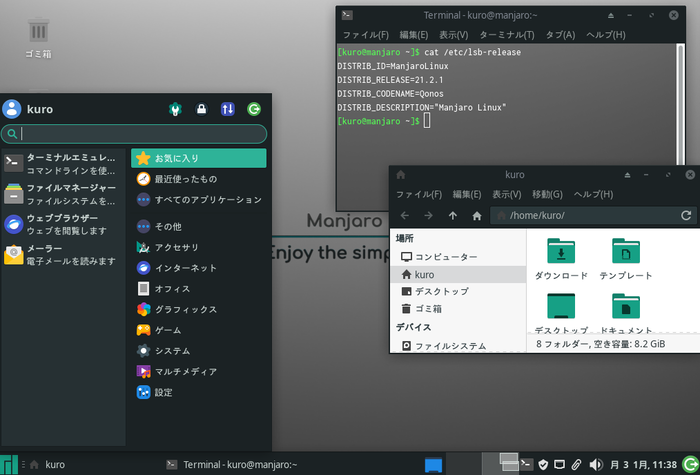
Manjaro aims to provide an environment that combines the simplicity and transparent system of Arch Linux with an easy-to-use installation method and GUI environment for beginners. Its concept is similar to EndeavourOS, but the approach differs in that it manages packages with its own tools and repositories. The relationship between Arch Linux and Manjaro is very similar to that between Debian and Ubuntu. Ubuntu also has a different repository from Debian and introduces its own tools. Manjaro is a distribution that aims to minimize the burden of system settings while leveraging the transparent system of Arch Linux, and it includes features not found in Arch Linux, such as Manjaro Hardware Detection (MHWD) for automatic hardware detection. Although Japanese input environment needs to be set up by yourself, which means it’s not a distribution that Japanese users can use immediately after installation, you can refer to many parts of the information-rich Arch wiki, so if you are interested in Arch-based distributions, why not give it a try? One point of caution is that Manjaro does not share repositories with Arch Linux, so it is not strictly Arch Linux. It can be said to be an Arch Linux-like distribution that follows Arch Linux’s package management system. Currently, distributions based on Manjaro have also emerged.
CachyOS
Arch-based for a Wide Range of Users, from Beginners to Experienced
| Item | Rating/Description |
|---|---|
| Base | Arch Linux |
| Package Management | pacman |
| Standard UI | KDE / GNOME |
| Japanese Display | No problem |
| Japanese Input | Manual setup required |
| Ease of Installation | 5 points |
| Recommendation for Beginners | 3 points |
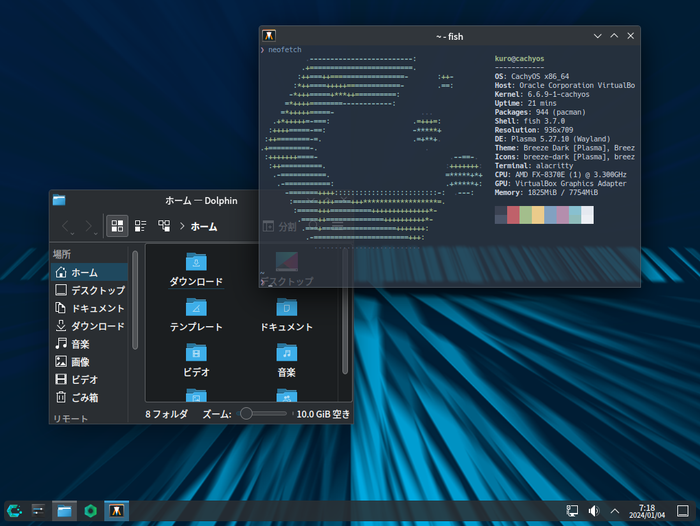
CachyOS is an Arch-based distribution that claims to provide a high-quality system for a wide range of users, from beginners to experienced Linux power users, with user-friendliness and high customizability. While it is indeed designed for beginners, the Japanese environment is not as user-friendly compared to Ubuntu or similar. If you expect the same level of friendliness as Ubuntu or Linux Mint, you might be a little disappointed.
Artix
A Commitment to Systemd-Free
| Item | Rating/Description |
|---|---|
| Base | Arch Linux |
| Package Management | pacman |
| Standard UI | KDE, GNOME, Xfce, LXQT, etc. |
| Japanese Display | Manual setup required |
| Japanese Input | Manual setup required |
| Ease of Installation | 3 points |
| Recommendation for Beginners | 2 points |
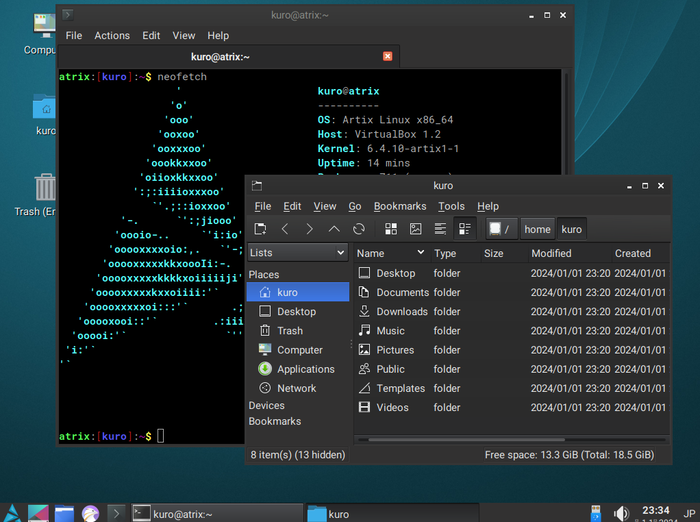
Currently, Arch Linux uses Systemd as its init system. Artix Linux was created by replacing this Systemd with something else. Four types of init systems have been introduced instead of Systemd: dinit, OpenRC, runit, and s6, all of which are available for download. If you are interested in init systems other than Systemd, why not give them a try? Installation could not proceed if Japanese display was selected, and it was forced to be in English. The Japanese environment needs to be built manually from scratch. Since it adopts an init system other than Systemd, which is a major Linux init system, knowledge of Systemd available online cannot be used, making it a distro that is difficult for beginners. If you are using Arch Linux and want to try other init systems, why not give it a try? It is similar to Obarun in that it does not use Systemd, but I personally find it more approachable, including installation, than Obarun.
ArchCraft
Easier Customization of Arch Linux
| Item | Rating/Comment |
|---|---|
| Base | Arch |
| Package Format | tar.xz |
| Standard UI | Openbox, Bspwm (Wayfire, sway, xfce, LXDE also selectable) |
| Japanese Display | Fonts installed, display no problem |
| Japanese Input | Manual package installation required |
| Ease of Installation | 5 points |
| Recommendation for Beginners | 3 points |
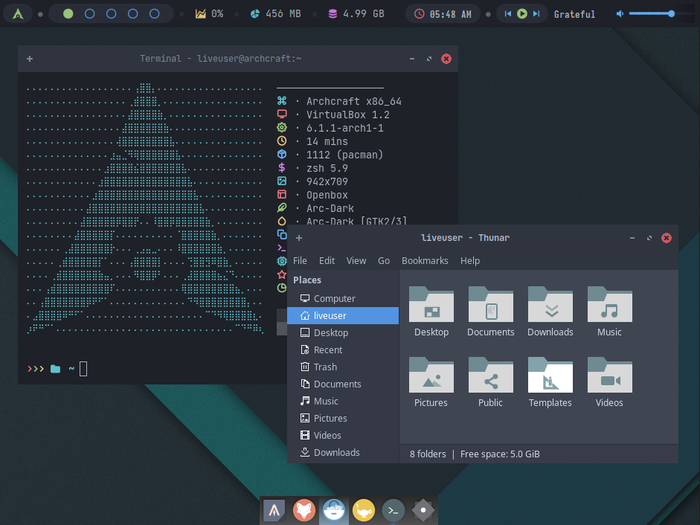
What if you could easily change window managers and desktop environments like changing clothes? Archcraft is a Linux distribution that answers such desktop users’ desires. With each window manager, you can finely customize the look and feel, from terminal color schemes to menu styles. Based on Arch Linux, it features the user-friendly Calamares installer and a fresh desktop environment design. It’s recommended for those who want to try Arch Linux easily, as well as current Arch Linux users. While building from a minimal environment is good, having a comfortable environment pre-configured is also convenient. Installation is easy in Japanese. Japanese fonts are pre-installed, so there are no display issues. However, Japanese input requires manual setup.
Garuda Linux
A New Star Bearing the Name of an Eagle
| Item | Rating/Comment |
|---|---|
| Base | Arch |
| Package Management | pacman |
| Standard UI | Xfce, KDE, GNOME, sway, Qtile, etc. |
| Japanese Environment | 3 stars |
| Ease of Installation | 5 points |
| Recommendation for Beginners | 3 points |
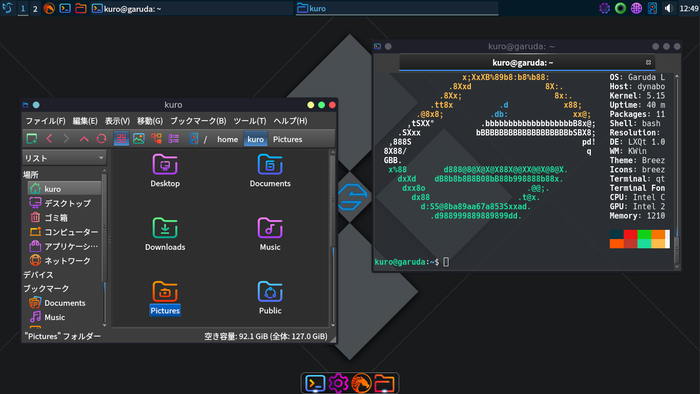
Garuda is a relatively new distribution that appeared in 2020, based on Arch Linux with a beautiful design and a challenging system. It distributes not only GNOME, KDE, and Xfce as desktop environments but also Wayfire, Qtile, and Sway as official editions, showing its commitment to newer technologies. The official page states that it is not intended for use in VMs and recommends installing it on physical hardware. While it may not be suitable for beginners, it might be an interesting distribution to try for those who are getting bored with current Linux.
Obarun
Arch that Chose s6/66 as an Alternative to Systemd
| Item | Rating/Comment |
|---|---|
| Base | Arch |
| Package Management | pacman |
| Standard UI | jwm, openbox, plasma, XFCE |
| Ease of Installation | 2 points |
| Japanese Display | Setup required, including font installation |
| Japanese Input | Manual setup required |
| Recommendation for Beginners | 2 points |
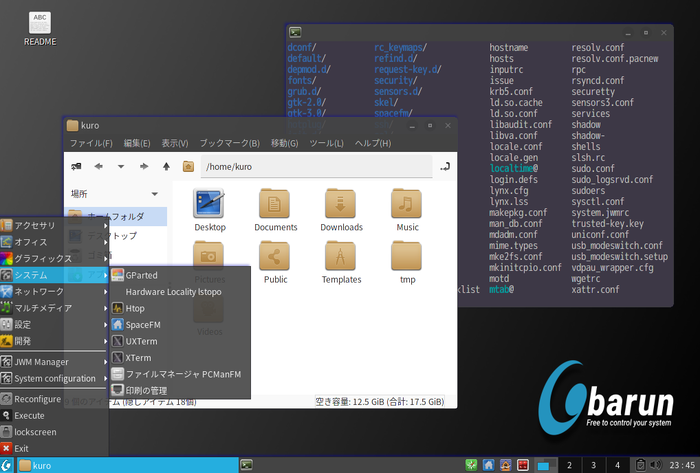
Obarun is a distribution based on Arch Linux, but it is characterized by introducing a different system from Arch Linux, especially in the init and service management parts. While Arch Linux uses Systemd for init and service management, Obarun adopts Skarnet’s S6 for init and uses its own management tool called 66 for service management. The installer is TUI-based, which looks inferior compared to other modern distributions. All operations need to be done in English, which may confuse beginners. Fine-grained package settings can be done during installation, so Japanese-related packages can be installed at this point.
For Those Who Want to Try Slightly Different Distros
For those who are a bit tired of major distributions, I’d like to introduce a few. I’ve gathered distributions that I found interesting in terms of their adopted technologies and concepts.
MocaccinoOS
The One Who Inherits Sabayon’s Will and Attempts to Reconstruct Gentoo
| Item | Rating/Description |
|---|---|
| Base | Gentoo/Sabayon |
| Package Management | Luet |
| Standard UI | KDE |
| Japanese Display | Manual setup required |
| Japanese Input | Manual setup required |
| Ease of Installation | 3 points |
| Recommendation for Beginners | 2 points |
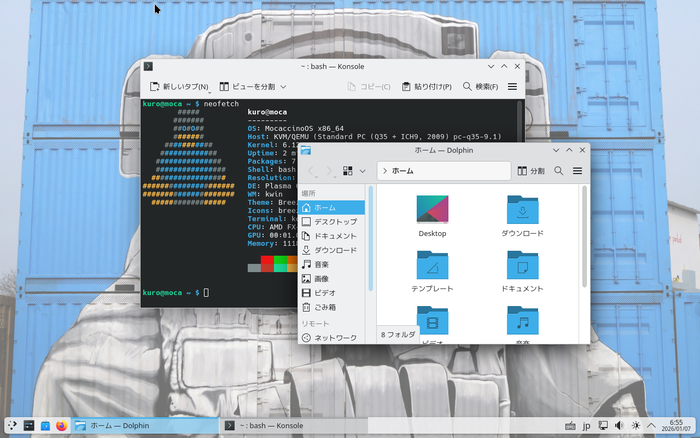
MocaccinoOS is a distribution independently developed based on Sabayon, a Gentoo derivative. It is not a clone of Sabayon but features its own package manager called Luet. Sabayon aimed to create a meta-distribution that allows users to assemble their own custom distribution by collecting small parts with a different approach than Gentoo, but as of January 2026, its activities have been suspended. MocaccinoOS can be called a project that inherits Sabayon’s will.
Regarding installation, there is a GUI installer, and the process itself is easy, but the problem is the Japanese environment. Since the installation media does not include Japanese fonts, it requires manual effort to install fonts for Japanese installation. This task would be too heavy for users new to Linux. Furthermore, even after installation, building the Japanese environment is a headache. Since official packages do not include Japanese input engines like “fcitx-mozc” or “ibus-mozc,” an approach that does not rely on official repositories is necessary.
The number of packages in the official repository is small, and it is undeniable that this distribution is still under development, but GUI applications can be used by utilizing Flatpak or similar. If you liked Sabayon’s usability, why not give it a try?
AerynOS
Maintaining Robustness with an Atomic System
| Item | Rating/Description |
|---|---|
| Base | Original |
| Package Management | moss |
| Standard UI | GNOME, KDE, COSMIC |
| Japanese Display | Manual setup required |
| Japanese Input | Manual setup required |
| Ease of Installation | 2 points |
| Recommendation for Beginners | 1 points |
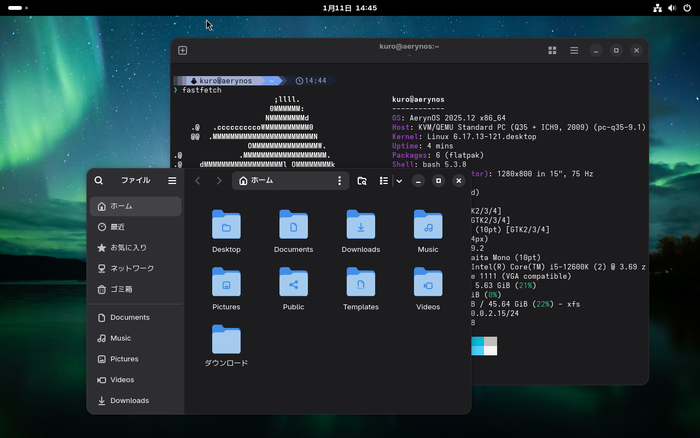
AerynOS is a uniquely developed distribution that aims to build an atomic system. Atomic means indivisible, but in the context of programming and systems, it means a state where an operation “either completely succeeds or does not happen at all.” In an atomic system, when updating, only a part of the system is not partially updated and broken. It either completely succeeds in updating or no update occurs at all. AerynOS achieves an atomic system by layering only the updated parts on top of the core system.
Unusually for a new distribution, it does not come with a GUI installer. The hard disk partition type only supports GPT, and a unique partitioning scheme requiring EFI and Linux boot extension partitions is necessary, but once that is done, installation can proceed relatively easily with the TUI installer.
Unfortunately, the Japanese environment requires all settings, including fonts, to be done manually. Regarding Japanese input, the official repository does not even have the necessary packages (as of January 2026). Therefore, ingenuity such as utilizing Flatpak is required.
Chimera Linux
A Chimera Made by Gathering Cutting-Edge Technologies
| Item | Rating/Description |
|---|---|
| Base | Original |
| Package Management | apk |
| Standard UI | GNOME |
| Japanese Display | Font installation and setup required |
| Japanese Input | Manual setup required |
| Ease of Installation | 2 points |
| Recommendation for Beginners | 1 point |
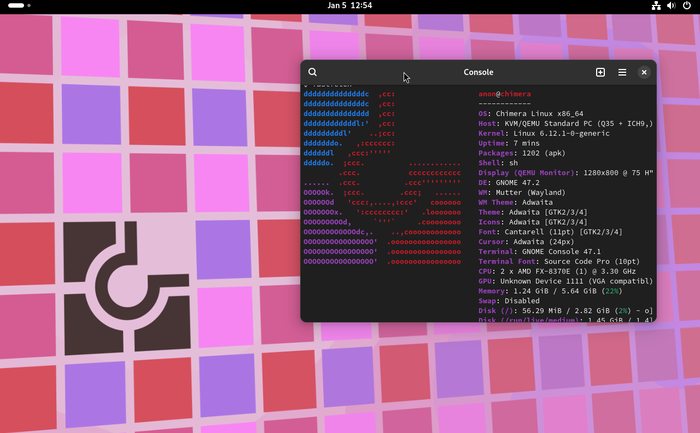
Chimera Linux is a uniquely developed rolling release distribution. It uses a FreeBSD-based userland, musl C library and LLVM toolchain for the standard C language library, and dinit for init and service management, making it a somewhat unusual distribution compared to current major distributions. While an interesting attempt, its usability is sacrificed due to the adoption of technologies not used by many distributions. The musl C library has almost no locale support, making it very weak from a multilingual perspective. This may be resolved if musl C supports multilingualism in the future. For package management, it uses the apk command, similar to Alpine Linux. For users who require an input method like Japanese, it is not a convenient Linux for everyday use, but it is an interesting distribution to try.
Mabox
Manjaro + Openbox = Mabox
| Item | Rating/Description |
|---|---|
| Base | Manjaro |
| Package Management | Pacman |
| Standard UI | Openbox |
| Japanese Display | Font installation and setup required |
| Japanese Input | Manual setup required |
| Ease of Installation | 4 points |
| Recommendation for Beginners | 3 points |
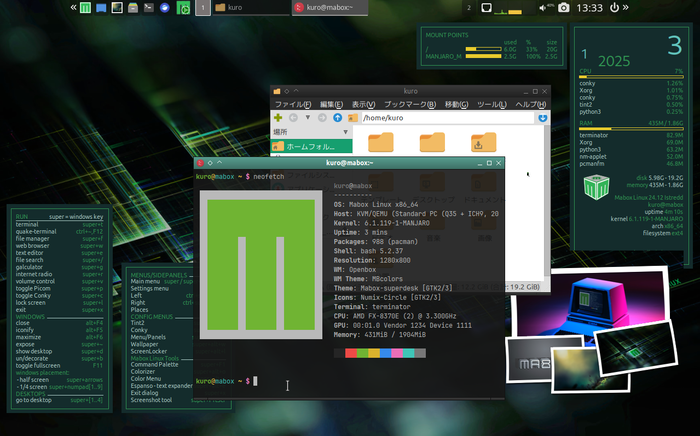
Mabox is a desktop-oriented distribution based on Manjaro with Openbox as its desktop environment. While many advanced desktop environments have UIs designed with touchscreens in mind, Mabox’s adoption of Openbox results in a somewhat nostalgic design that computer enthusiasts might prefer. Mabox is not simply Manjaro with Openbox; it comes with its own Mabox Tools, allowing users to perform system settings, change the look and feel, and change wallpapers without directly touching Openbox settings. Since it is based on Arch-based Manjaro, package management is generally done with pacman operations, but if you prefer a GUI, Pamac is pre-installed and can be used. Please note that Pamac’s AUR support is initially off.
Japanese support is not very user-friendly. The installer does not include Japanese fonts, so if you want to install in Japanese, you need to manually install Japanese fonts. After installation, you also need to manually set up the Japanese font and Japanese input environment. On the other hand, Manjaro’s ease of use, such as hardware detection, is still present, and installation can be done very smoothly, except for the language issue. For those who are a bit tired of desktop environments like KDE and GNOME, it might be an interesting distribution.
Vanilla OS
Achieving Usability and Security with Virtualization Technology
| Item | Rating/Description |
|---|---|
| Base | Debian |
| Package Management | flatpak, container operations with apx, ABRoot |
| Standard UI | GNOME |
| Japanese Display | Japanese display OK from the start |
| Japanese Input | Possible with flatpak’s fcitx5 installation |
| Ease of Installation | 3 points |
| Recommendation for Beginners | 1 point |
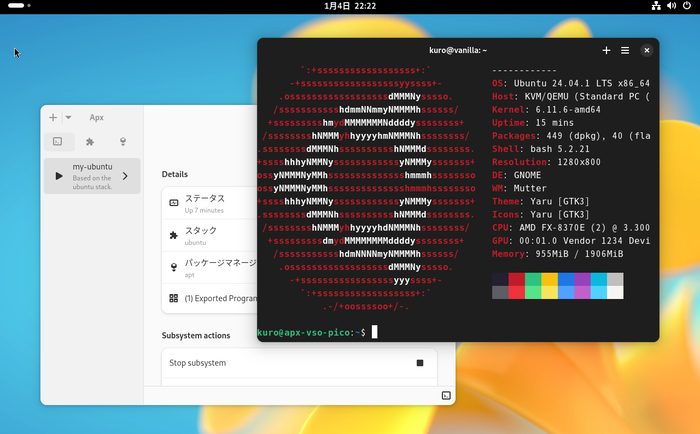
Vanilla OS is a Debian-based immutable distribution, a type of immutable distro that has become common in recent years. The core part of the host system cannot be modified by the user, and users work on containers. Vanilla OS uses its own management tool APX to run arbitrary Linux distributions such as Fedora and Ubuntu, and can install packages using the package manager of that distribution. Packages installed in subsystems like Ubuntu can be exported with APX or launched from the subsystem with the apx command, making them available from the host system. It also provides ABRoot, a tool for securely transacting changes to the system before and after, with an emphasis on security. ABRoot also acts as a package manager, so package management seems a bit complex.
Regarding packages, in addition to the package managers of various distributions within containers, Flatpak can be used by default, and packages can be installed using apt in the VSO shell, which is a virtual environment separate from the host system. For Japanese display, Japanese fonts are installed from the initial stage, so there are no problems. Japanese input requires manual setup. Since the core part of the system is read-only, traditional settings did not work, which was difficult, but Japanese input became possible with the introduction of packages via flatpak.
blendOS
Blend Multiple Distributions!!
| Item | Rating/Description |
|---|---|
| Base | Arch |
| Package Management | pacman, apt, flatpak |
| Standard UI | GNOME |
| Japanese Display | Font installation and setup required |
| Japanese Input | Manual setup required |
| Ease of Installation | 3 points |
| Recommendation for Beginners | 1 point |
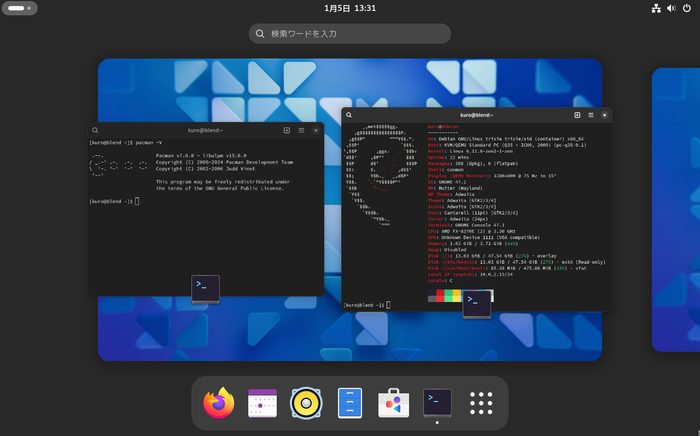
What if there was a distribution where you could mix various existing distributions in one place and freely use apt, pacman, and dnf? blend OS is a distribution that makes such a dream come true. It runs containers of Ubuntu, Debian, Fedora, Arch, CentOS Stream, etc. on an Arch-based host, and can use the package managers of each distribution. This allows for operations that go beyond the conventional wisdom of package management by using virtualization technology, such as obtaining packages not found in pacman with apt. Applications installed from each container are displayed as icons on the host machine and can be used without being aware of the container. In addition to pacman and flatpak available on the host, apt, pacman, dnf, etc. can be used on containers.
The immutability of the core system and the fact that it is built around container technology are very similar to Vanilla OS. For this reason, pacman cannot be used directly on the host machine, and packages are described in a blendOS-specific configuration file called system.yaml, and the entire system is updated using a system update tool called akshara. This is similar to how Vanilla OS uses ABRoot to transact states. I felt that it might be a bit difficult to handle for those unfamiliar with immutable distros.
Regarding the Japanese environment, both display and input require manual setup, including font installation. Japanese cannot be selected during installation, so all operations will be in English.
Nitrux
A Unique Worldview Composed of a Fluid Desktop and Toolset
| Item | Rating/Description |
|---|---|
| Base | Debian / Ubuntu |
| Package Management | AppImage, Flatpak, Distrobox |
| Standard UI | NX Desktop (Plasma) |
| Japanese Display | No problem |
| Japanese Input | No problem (fcitx5 available from the start) |
| Ease of Installation | 5 points |
| Recommendation for Beginners | 4 points |
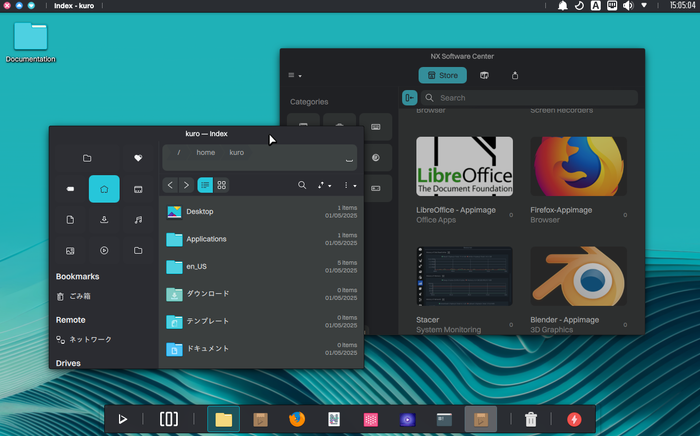
Nitrux is a distribution characterized by its KDE Plasma-based NX Desktop and AppImage-centric package management. Since AppImage cannot cover all the software users want, it is supplemented with Flatpak and Distrobox, taking an approach that does not rely on package managers like other distributions. It also features Maui Apps, which are composed using the MauiKit UI framework. Nitrux, with its unique worldview of NX Desktop, Maui Apps, and AppImage-based package management, may show a new side of Linux to users who have been using other distributions and are getting bored.
Regarding Japanese, both display and input can be used without problems immediately after installation. The smartphone-like way of using it, where you install necessary apps without being conscious of the package manager, is also suitable for beginners.
Rhino Linux
A Distro Aiming for an Ubuntu Like Arch Linux
| Item | Rating/Description |
|---|---|
| Base | Ubuntu |
| Package Management | APT, Pacstall, flatpak |
| Standard UI | Xfce |
| Japanese Display | No problem |
| Japanese Input | Manual setup required |
| Ease of Installation | 5 points |
| Recommendation for Beginners | 4 points |
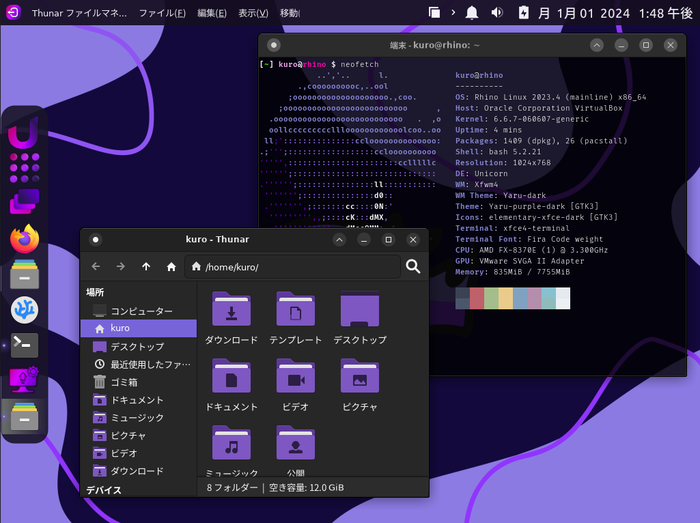
Rhino Linux is an Ubuntu-based distribution created with the concept of reinventing Ubuntu. Unlike mainstream Ubuntu, it adopts a rolling release and is built around Pacstall for package management and the Xfce desktop. Pacstall, mentioned above, is an attempt to realize Arch Linux’s AUR on Ubuntu. It uses pacscripts files instead of AUR’s PKGBUILD files for package management. Thanks to Pacstall, Rhino users can use the latest packages just like Arch users. Installation is very easy with the GUI Calamares, and there are no particular difficulties. It’s an interesting distro that attempts to achieve an Arch Linux-like mechanism on an Ubuntu base, with rolling releases and AUR-mimicking package management. However, because of this, package management is more complex than Ubuntu, and it might be a bit difficult for those new to Linux.
Finally
Around this time last year, while writing an article introducing Linux distributions, I was thinking, “With the advent of the AI era, no one will read blog articles, so this will be the last time for this project.” However, due to factors such as the end of Windows 10 support, I received feedback that there was surprisingly a demand for articles introducing Linux distributions, so I decided to write it again this year.
Since Linux distributions do not see dozens of new ones born every year, there are naturally some overlaps with last year’s article. Nevertheless, I believe I was able to introduce new elements and cater to both beginners and those looking for slightly different distributions.
When Ubuntu first appeared, it broke the stereotype that traditional Linux meant Red Hat-based systems, creating a situation where Ubuntu became synonymous with desktop Linux. Many distributions were created by simply layering a preferred UI on top of Ubuntu, which I found somewhat uninspiring. As of January 2026, looking at Linux distributions, there are many Arch-based distributions, independent ones like Solus and AerynOS, OpenSUSE derivatives like RegataOS, and projects inheriting Sabayon like MocaccinoOS. I think the current state is much more interesting compared to the era dominated by Ubuntu derivatives.
Furthermore, with advancements in hardware, distributions like VanillaOS and BlendOS, which utilize container technology to handle multiple distributions, have emerged. The integration of package management with virtual spaces like Flatpak and Snaps, and native core packages, has also become increasingly common.
Finally, I would like to express my sincere gratitude to the readers for their warm encouragement, which allows me to continue writing this article. Thank you very much. If I am still well next year, I would like to write this article again in a year. I wish you all a healthy year.
